
Power BI is great at showing you your numbers. But finance needs to do more than look at them.
There is a very good reason Power BI has become so popular. It can take information from different systems and turn them into attractive, interactive dashboards. You can see trends, compare results, drill into the detail and quickly understand what is happening in the business.
If the question is “What happened?”, Power BI is excellent. But finance usually has a few more questions:
- What should happen?
- What do we think is going to happen?
- What happens if things change?
- Who is responsible for the numbers?
- Has the budget been approved?
- How do we bring all our companies together?
- Can I produce the same financial report next month without having to rebuild it?
These are different questions. And this is where a purpose-built FP&A system such as Solver starts to look very different from Power BI.
This isn’t about saying Power BI can’t do these things. Microsoft has continued to add planning capabilities to its wider Fabric platform, including budgets, forecasts, scenarios and the ability to enter and save planning information.
The question is simpler: How much work does finance have to do to make Power BI work the way a finance team works?
There are four areas where the difference becomes particularly obvious.
1. Financial reports: a P&L isn’t a dashboard
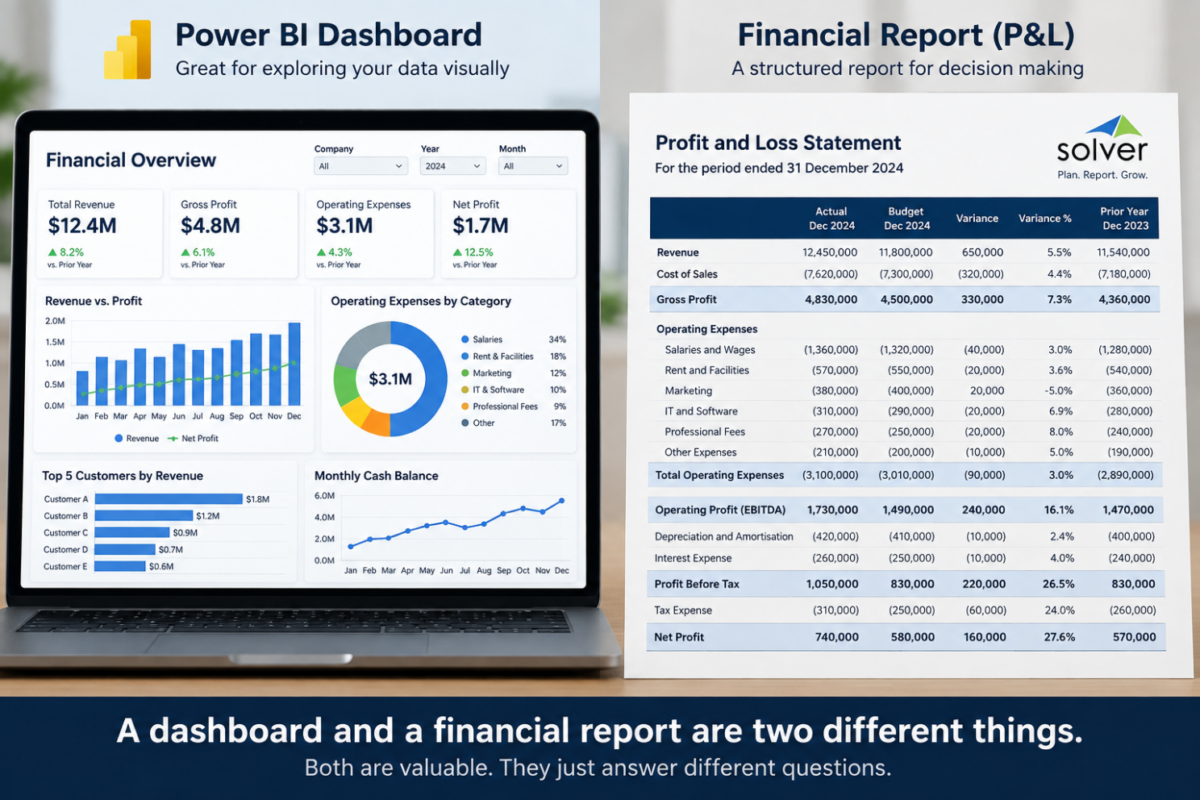
Let’s start with something every finance team does.
Someone asks: “Can you give me the monthly P&L?”. They probably want something that resembles a true financial report. Then they probably want:
- the accounts in the right order
- headings and subtotals
- proper indentation
- current month and year-to-date
- budget and actual
- variance and variance %
- prior year
- drill-down to the accounts behind the numbers
- the right number formats
- negative numbers displayed correctly
- a report that looks the same every month
- something they can print or send to the board
To a finance person, this is just a P&L. Power BI can produce one, but this is where things can get complicated.
Power BI is designed first and foremost for exploring and visualising information. You can build financial reports using its Matrix visual, and Microsoft also provides paginated reports for highly formatted reports that need to print or export neatly.
So it can be done. But the more particular your financial report becomes, the more work can be involved in getting it to behave exactly as finance expects.
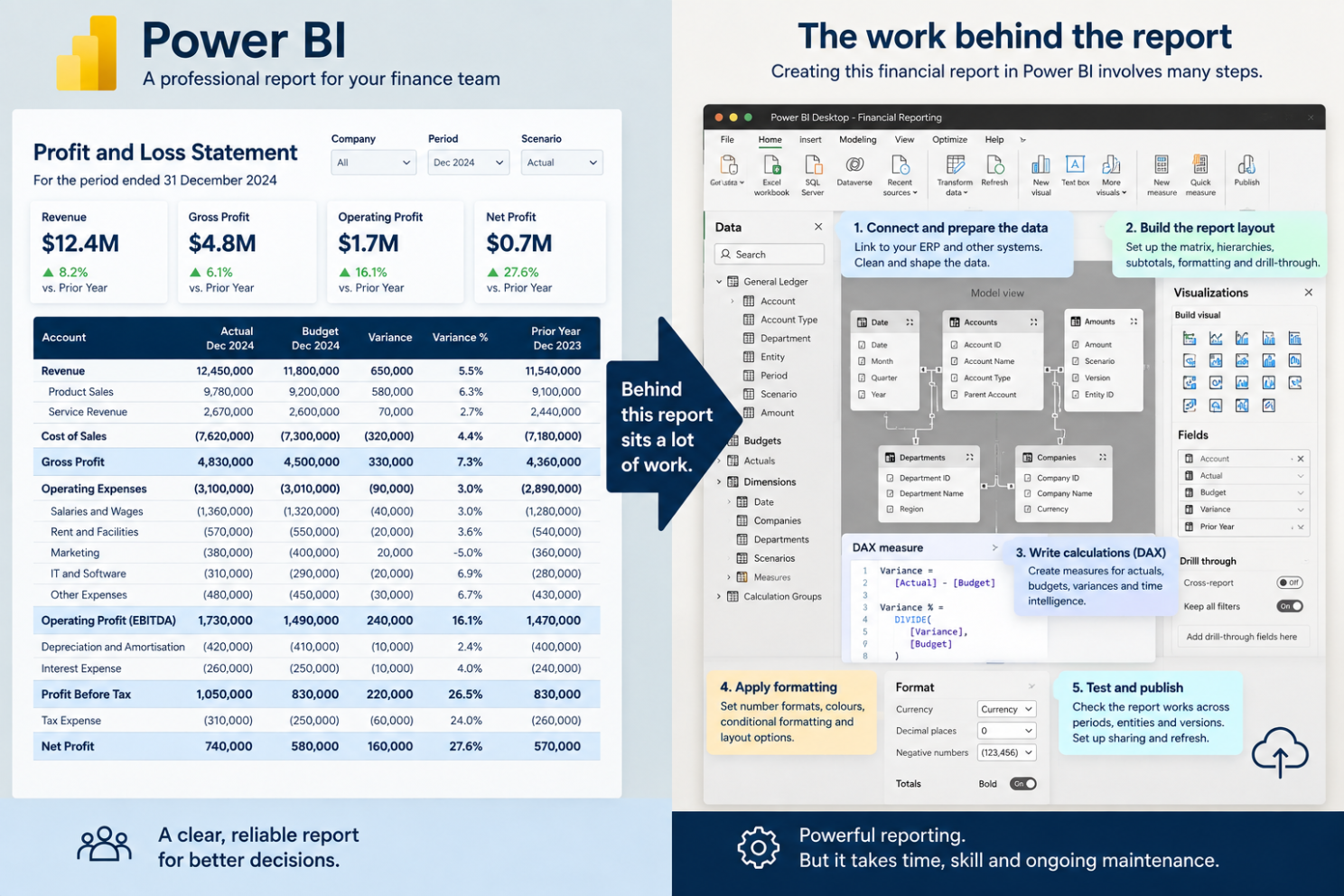
An FP&A system starts from a different place. Financial reports aren’t something you have to adapt the system to produce. They are one of the things the system was built to do. Solver provides financial reporting, including drill-down, and lets finance teams design reports using Excel.
So the difference isn’t:
“Power BI can do reports and so can Solver.”
The difference is what each system was designed to do — and how naturally the financial reporting process fits into that design, and that’s where Solver shines.
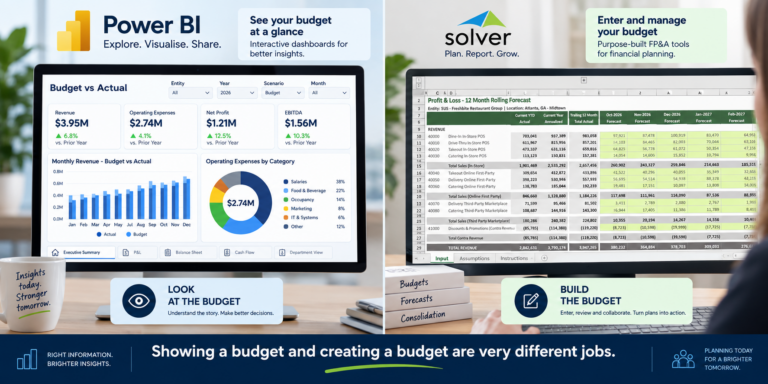
2. Budgeting: showing a budget is easy. Building one is harder
This is where the difference becomes even clearer.
Power BI can show you your budget. But let’s say you’re the Finance Manager and you want to change next year’s marketing budget from $100,000 to $125,000. Where do you enter the $125,000?
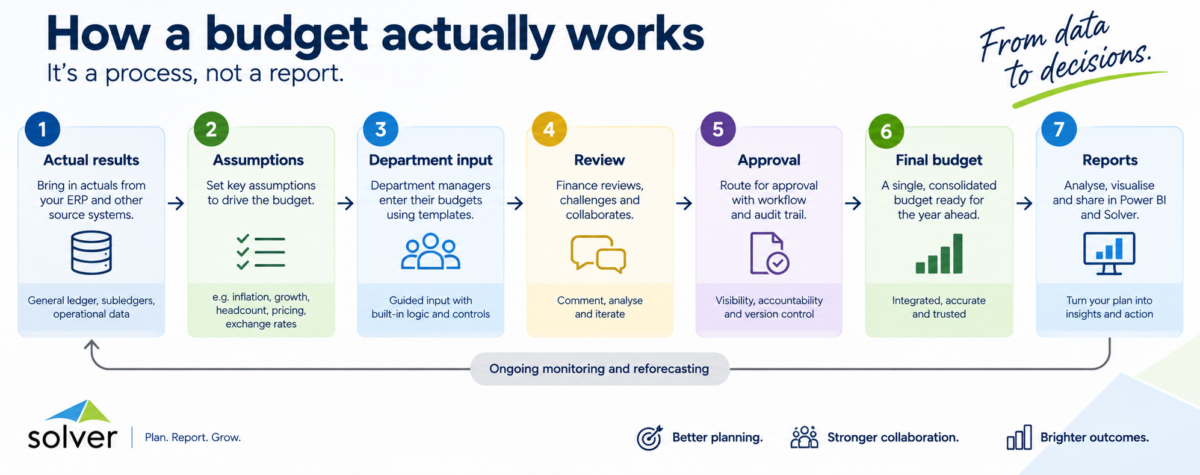
That sounds like a simple question. It isn’t. A real budgeting process might involve:
- Sending budget forms to department managers
- Giving each manager access to their own area
- Starting with last year’s actual results
- Adding assumptions
- Calculating some budgets from drivers
- Spreading annual amounts across months
- Checking the numbers
- Sending budgets for approval
- Making changes
- Keeping different versions
- Locking approved budgets
- Comparing the budget with actual results
- Keeping a record of who changed what
The budget isn’t just something you look at. It is something you have to build.
Microsoft has recognised this too. Its newer Fabric Planning capabilities allow users to enter budgets and forecasts, create scenarios and save the resulting planning information for use in Power BI and other parts of the Microsoft platform.
So it would be wrong to say “Power BI can’t do budgeting”. It can. The better question is: “How do you want to run your budgeting process?”
Because once people need to enter and change numbers, you need somewhere for them to do it. You need to control who can change what, know which version is the approved budget, manage changes, and make sure those numbers flow into your financial reports.
This is where an FP&A system has an advantage. Budgeting isn’t an extra feature. It is one of the main jobs the system is designed to handle.
3. Forecasting: looking at a forecast isn’t the same as managing one
Forecasting is another good example. Imagine the CFO asks:
“What happens if revenue is 8% lower than we expected?”
You can show that in a report, but then they might say, “Reduce our variable costs as well. Delay those two new hires by three months. Reduce marketing by 5%. Show me what that does to EBITDA and cash.”
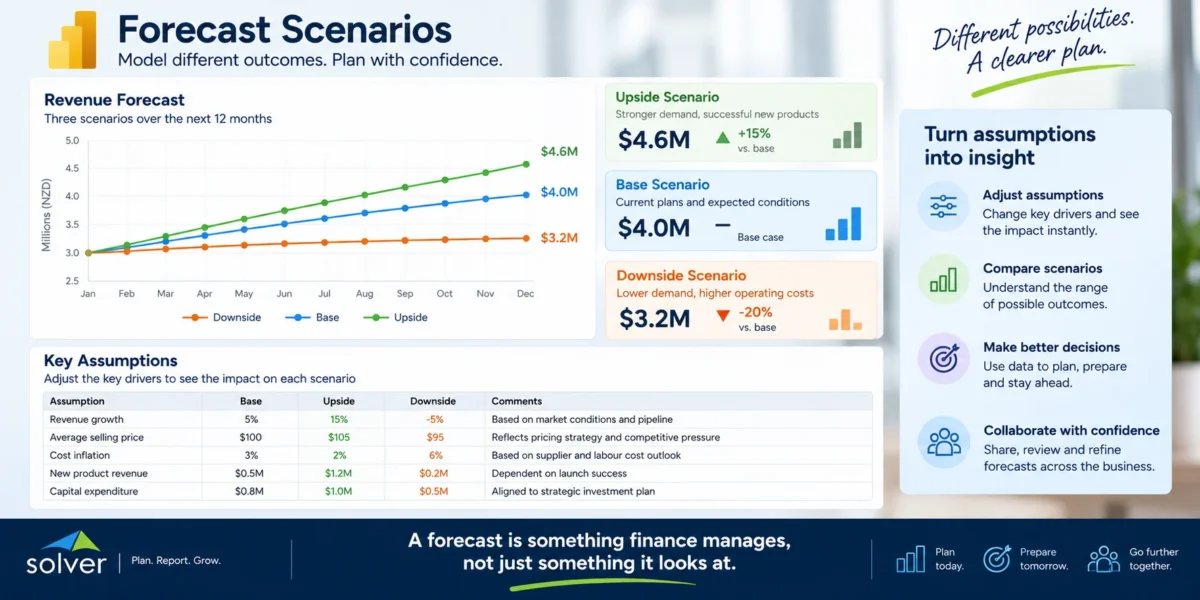
Now we’re not just looking at information. We’re changing assumptions and seeing what happens. The CFO might then want to see a best-case forecast, a normal forecast and a worst-case forecast. And next month, when actual results arrive, they want to update the forecast again — while keeping the previous forecast so they can see what changed.
Microsoft’s current planning tools can support forecasting and scenarios, so again, this isn’t something we should claim Power BI simply can’t do. But the question remains:
Do you want to build and manage that process yourself, or do you want a system designed for it?
Solver is designed to manage budgets, forecasts and what-if scenarios alongside financial reporting and analysis. Finance doesn’t just want to see the forecast. It needs to own and manage it.
4. Consolidation: adding companies together isn’t the whole job
Imagine you have five companies, three currencies, intercompany transactions, shared costs and different accounting systems. Power BI can bring all that information together and show you a group result. But consolidation is more than adding five sets of numbers together. You may need to convert currencies, remove intercompany transactions, make consolidation adjustments, deal with different account structures, apply different rules to different companies, allocate shared costs and check that everything balances.
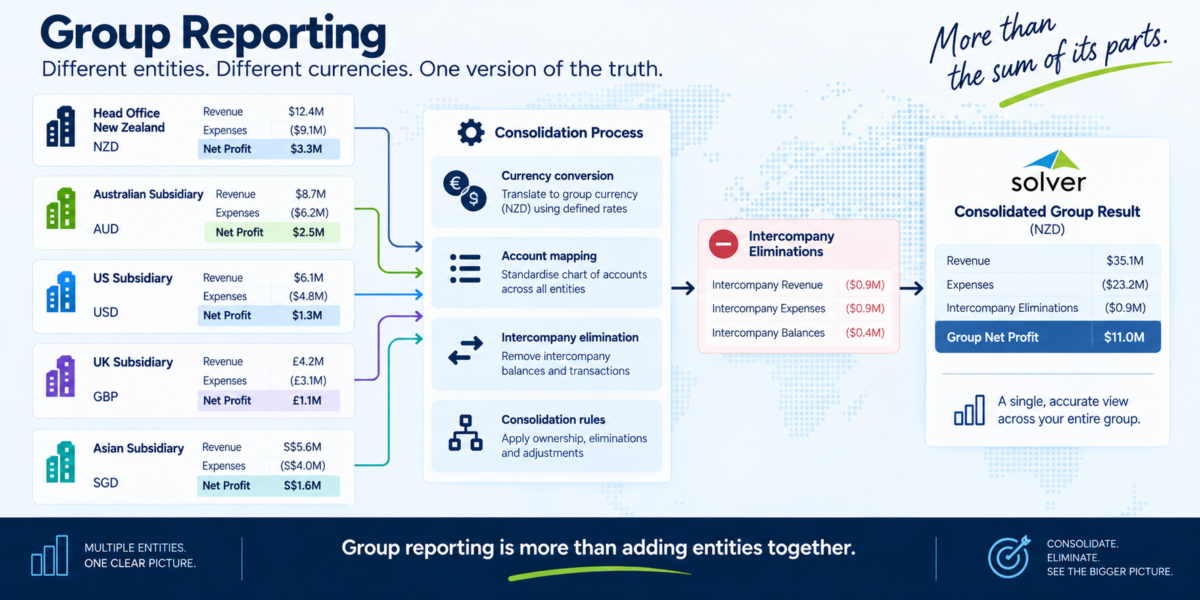
And the same applies to allocations. You might need to say Allocate our IT costs based on headcount or Allocate rent based on the size of each location.
Those aren’t simply reports. They are rules that need to be applied to the numbers.
Power BI can show the final result beautifully. But there is a difference between Reporting the result and Running the process that creates the result.
Solver includes consolidation capabilities such as multi-company consolidation, currency conversion and eliminations.
Again, the important point isn’t that Power BI can’t display a consolidated report. It can. The question is where you want the financial process to happen.
So is Power BI bad for finance?
No. Far from it. Power BI is incredibly useful for finance.
It is particularly good at:
- Dashboards
- Charts
- Trends
- KPIs
- Comparing information
- Drilling into data
- Giving executives a visual view of the business
- Letting people explore information for themselves
The real issue comes when we ask it to do something very different:
- Build the budget
- Collect budget inputs
- Manage forecasts
- Create scenarios
- Produce structured financial reports
- Consolidate companies
- Apply financial rules
- Manage the financial process
That’s where a purpose-built FP&A system can make life much easier. And this leads to what I think is the most important point of all.
5. Why choose? Use both.
There is no reason an organisation has to choose between Solver and Power BI. Why not use both?
Power BI is very good at showing dashboards. Solver is designed to manage the financial information and processes underneath it.
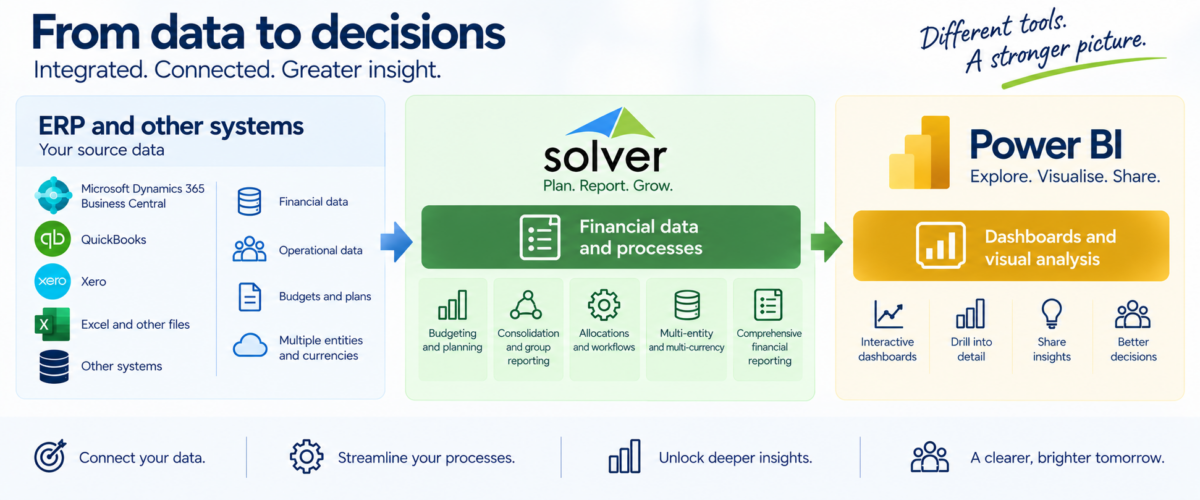
That’s exactly why Solver has invested in its Power BI integration.
Solver can provide the financial foundation — including reporting, budgeting, forecasting and consolidation — while Power BI provides the highly visual dashboards and analysis that many organisations want.
Solver connects to Power BI through its API, and Solver has created a large library of pre-built Power BI templates that can be used with Solver data. Solver currently promotes more than 50 pre-built Power BI templates through QuickStart.
You don’t have to start with a blank screen
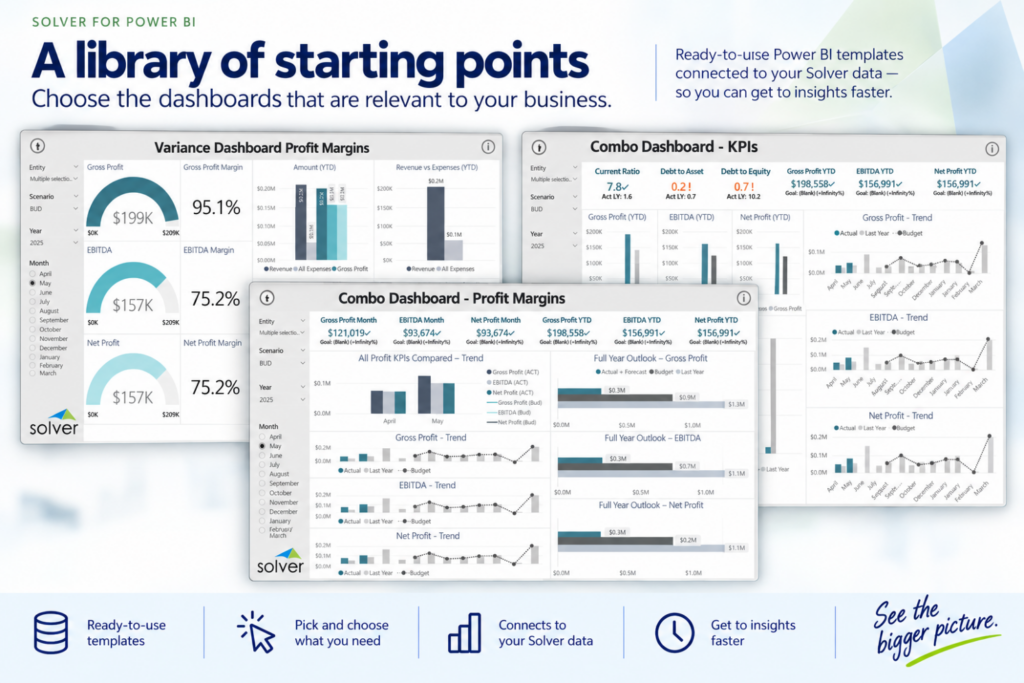
Do you need all of them? Probably not. And that’s fine, but the point is that you can pick and choose.
You might want a particular General Ledger dashboard. Someone else might want a management P&L. Another person might want a sales analysis. Another might want a cash-flow dashboard.
Instead of starting from a completely blank Power BI report, you have a collection of starting points.
The templates are designed to work with a Solver environment configured for QuickStart. For existing Solver customers who weren’t implemented using QuickStart, some configuration may be required first.
Once that is in place, the templates connect to your Solver data through the API, making it much faster to get useful Power BI reporting up and running.
The best of both worlds
The simplest way to think about it is
Solver handles the financial work.
Budgeting Forecasting Financial reporting Consolidation Financial data Financial rules
Power BI handles the visual experience.
Budgeting Forecasting Financial reporting Consolidation Financial data Financial rules.
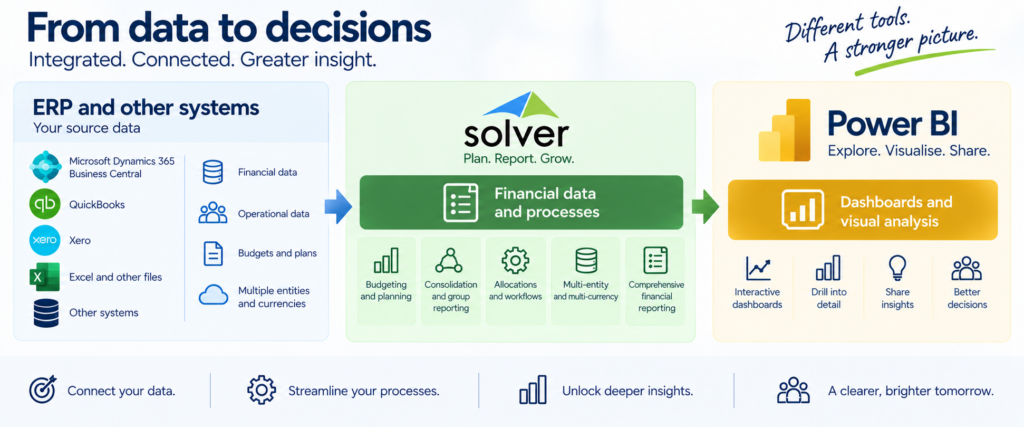
This isn’t about replacing Power BI, or making Solver compete with it as a dashboard tool. It’s about using each product for what it does best.
The real question
The question isn’t simply whether Power BI can do FP&A. With Microsoft’s continued investment in planning, it increasingly can. The more useful question is how you want your finance function to work. Every organisation has its own reporting requirements, budgeting processes, forecasting methods, structures and rules. Solver provides a purpose-built environment for designing and managing those financial processes around the needs of the organisation. Power BI brings a different strength. It provides powerful visual analysis, dashboards and ways to present financial information across the business.
So why choose between them?
Solver can provide the financial foundation, while Power BI provides the visual experience.
Together, they give finance a way to manage the financial process and give the wider business a clear view of the results. You don’t need one product to do everything. You need the right combination of tools to do the job well.
Want to see how it works?
Solver provides a comprehensive financial planning and reporting environment together with Power BI integration and a large library of pre-built templates. With QuickStart, you can get started with pre-built reports and dashboards and connect them to your Solver environment through the Solver API.
If you’d like to see how Solver and Power BI work together, talk to us. We’d be happy to show you.