
What if your budget process could be simpler, more connected and far less labour-intensive?
If your annual budgeting process involves preparing Excel templates and sending them to department heads, branch managers or store managers, you’ll probably recognise what happens next. The files gradually come back, but not always in the condition they were sent out.
Someone has inserted additional rows, another person has deleted lines they didn’t think they needed, and someone else has changed a formula or rearranged the layout. Before you can even begin analysing the results, Finance is left checking submissions, correcting inconsistencies and working through the task of consolidating everything into one overall budget.
For many organisations, this has become an accepted part of the budgeting cycle. Yet as the number of departments, branches and contributors increases, so does the administration involved in managing the process.
Finance teams can spend days chasing submissions, checking spreadsheet versions and resolving consolidation issues, leaving less time to review assumptions, challenge proposed expenditure and help the business plan for the year ahead.
The challenge of managing multiple budget files
Excel remains a useful and familiar tool for budgeting, but managing a collection of separate files introduces complications that can be difficult to avoid. Each spreadsheet represents another version to track, another submission to validate and another opportunity for inconsistencies to creep in.
When users change the structure of their templates, the consolidation process becomes even more complicated, particularly when the same exercise must be repeated for revised budgets or subsequent forecasting rounds.
The real cost is not simply the time spent combining spreadsheets. It is the opportunity cost of having experienced finance professionals occupied with administration rather than analysis. Instead of focusing on what the numbers tell us about the business, too much time is spent making sure the numbers have been collected and assembled correctly.
What if everyone could use the same template?
Imagine replacing the distribution of individual spreadsheets with a common budgeting template that can be shared by multiple contributors. Department heads, branch managers and store managers can enter the information relevant to their areas while working within a consistent structure, rather than each maintaining a separate copy of the same file. The information can then be consolidated centrally without Finance having to manually combine every submission.
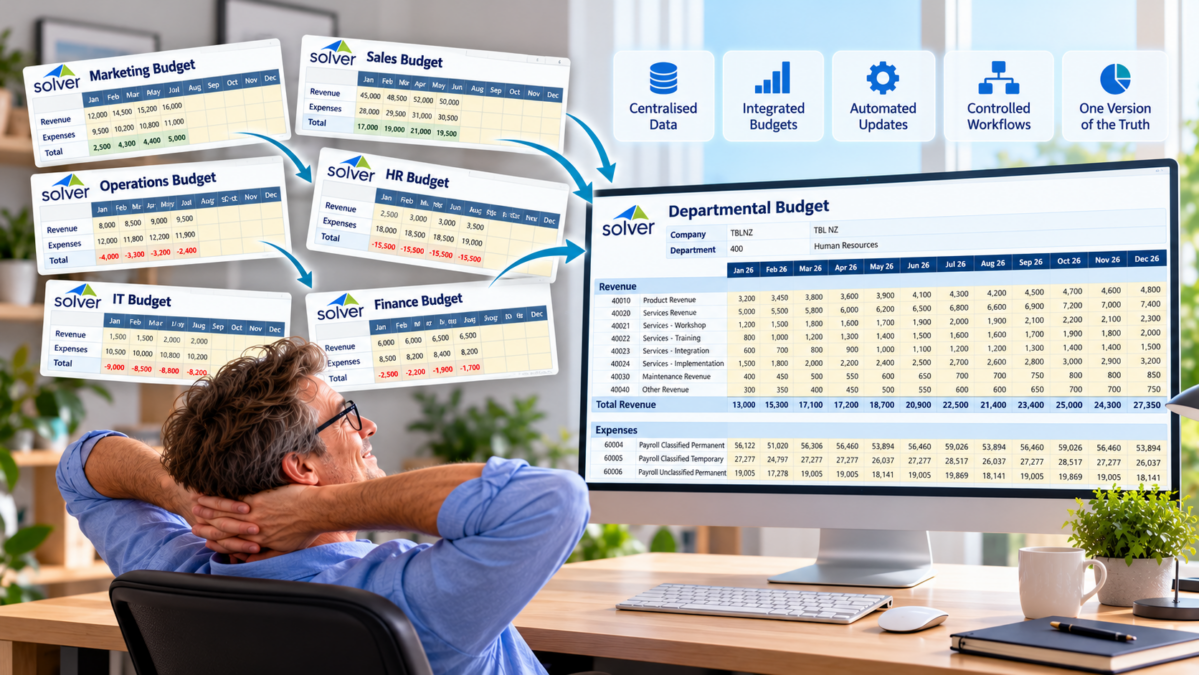
This is the approach offered by Solver Cloud. Shared input templates and automatic consolidation help organisations streamline the collection of budget information while reducing the administrative work associated with managing multiple spreadsheet files. The process becomes easier to coordinate, and Finance can spend less time assembling the budget and more time reviewing its contents.
But simplifying the collection of departmental budgets is only one part of the opportunity. What if you could take the same thinking further and connect the different areas of your organisation that contribute to the overall financial plan?
Connecting operational budgets to the bigger picture
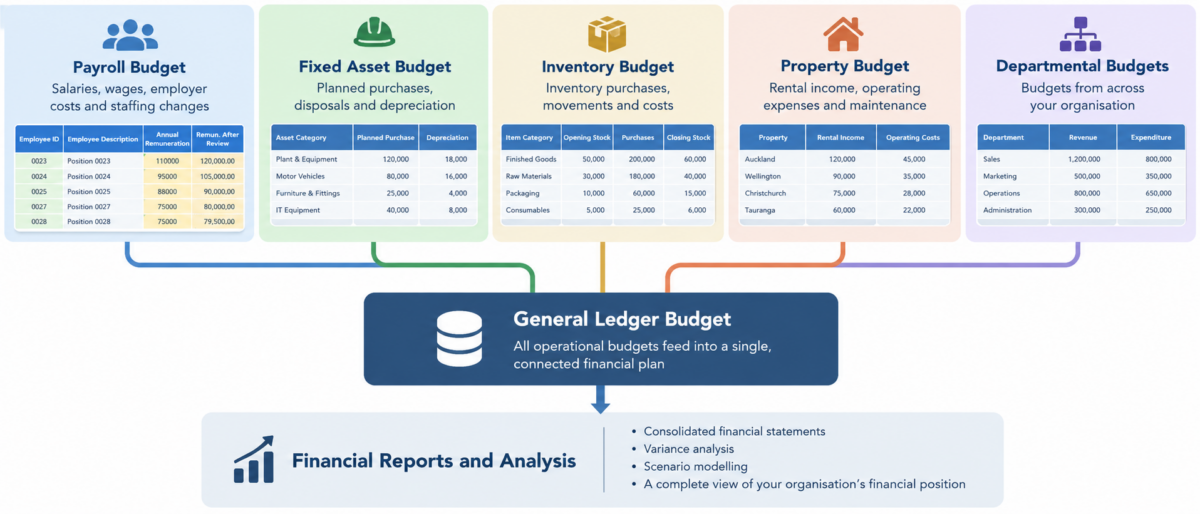
An organisation’s General Ledger budget is influenced by much more than the figures submitted by individual departments. Payroll costs, planned asset purchases, depreciation, inventory movements and property-related income and expenditure can all have a significant impact on future financial results. Yet these areas are often budgeted separately, using their own spreadsheets, calculations and assumptions, before Finance attempts to bring the results together.
Consider payroll budgeting, for example. Rather than manually calculating staffing costs in a spreadsheet and transferring the resulting figures into the financial budget, a dedicated payroll budgeting model can calculate the relevant costs and feed the resulting financial impact into the General Ledger budget, according to the model’s configuration. Changes to planned staffing or remuneration can therefore be reflected in the wider financial plan without requiring Finance to rebuild the numbers from scratch.
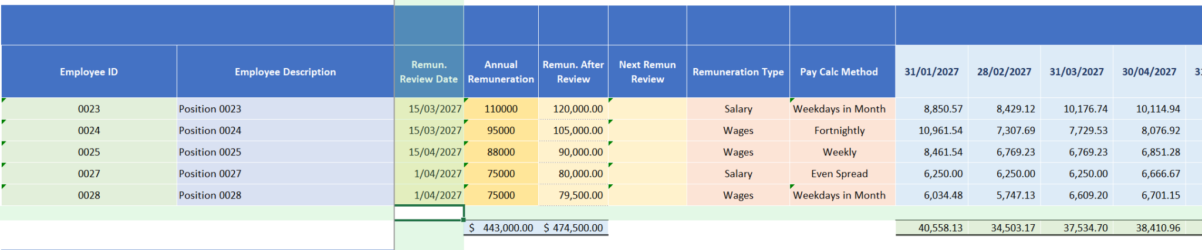
The same principle can apply to other operational areas. Fixed asset budgeting can model planned purchases, disposals and depreciation, while inventory budgeting can help calculate the financial impact of inventory-related plans. Property budgets can incorporate relevant income and expenditure, and departmental or branch budgets can bring together the expectations of managers across the organisation. Each area has its own requirements, but the objective is the same: to ensure that the operational assumptions driving the business are reflected in its financial plan.
And these are just some of the possibilities. Depending on an organisation’s requirements, additional budgeting models can be developed to address other operational needs and connected to the broader budgeting process. Rather than treating every budget as an isolated exercise, Solver Cloud provides a platform for bringing these activities together into a more integrated approach to financial planning.
From spreadsheet consolidation to integrated planning
When operational budgets contribute to the General Ledger budget, Finance has a more complete view of the organisation’s expected financial performance. The impact of decisions made in one area can be reflected in the wider plan, subject to the way the relevant models and integrations are configured. This makes it easier to review the overall financial position, understand the consequences of proposed changes and assess different scenarios before decisions are made.
It also changes the role of Finance in the budgeting process. Instead of spending a disproportionate amount of time collecting information, correcting files and consolidating figures, the team can concentrate on whether the assumptions make sense, whether resources are being allocated effectively and whether the resulting budget supports the organisation’s objectives. The technology helps manage the process, while Finance applies the knowledge and judgement needed to make the budget meaningful.
From budget preparation to review and approval
Collecting and consolidating budget information is only part of the budgeting process. Once submissions have been completed, budgets often need to be reviewed by department managers, checked by Finance and approved by senior management before they can be finalised. When this process is managed through email and separate spreadsheets, it can be difficult to track progress, identify outstanding submissions and establish which budgets have been reviewed or approved.
Solver Cloud workflows can help bring structure and control to this process. Approval steps can be incorporated into the budgeting workflow so that submissions move through the required review and approval stages, with visibility over progress and outstanding actions. Rather than relying solely on email reminders and manually maintained tracking sheets, the organisation can manage budget submissions within a more controlled process.
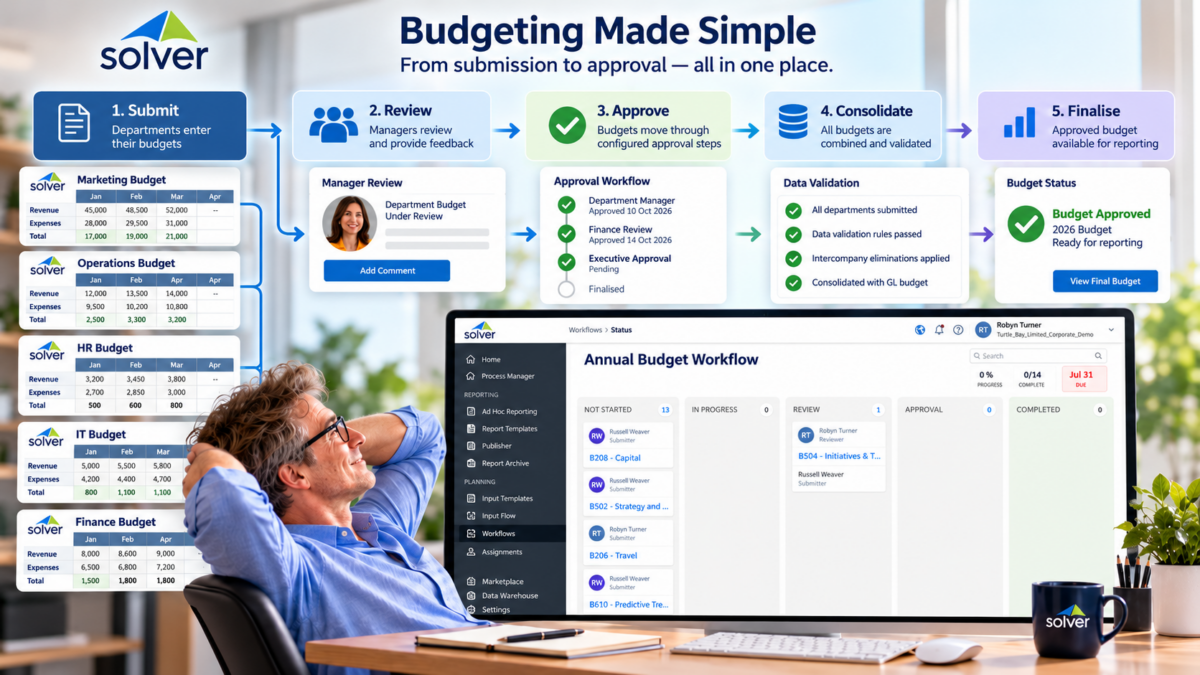
This is particularly valuable when budgeting involves multiple departments, branches or levels of management. Finance can coordinate the overall process while budget owners and approvers fulfil their respective responsibilities. Combined with shared input templates and connected budgeting models, workflows help turn budgeting from a collection of spreadsheet tasks into a more coordinated process, from initial preparation through to final approval.
A better way to budget
Whether your organisation is still distributing individual Excel files or already uses budgeting software, it is worth considering whether your current approach is delivering the best possible outcome. Could you simplify the collection of budget information, reduce manual consolidation and connect payroll, fixed assets, inventory, property and departmental budgets to a more comprehensive financial plan?
Solver Cloud offers a way to address these challenges through shared input templates, centralised budgeting data and connected budgeting models. For organisations looking to improve an established process, it can help reduce the administrative burden of preparing budgets. For those looking beyond spreadsheet-based budgeting altogether, it opens up the possibility of a more connected approach in which operational planning and financial planning work together.
Ultimately, budgeting should be about understanding the business, allocating resources and planning for the future, rather than spending days assembling spreadsheets. If your Finance team is ready to rethink its budgeting process, it may be time to look beyond the individual file and consider what an integrated budgeting solution could achieve.